Google My Business Tutorial: Harnessing the Power of Local SEO
By
 Saad Malik

Auto-Generate Review Replies
Our Free AI tool writes professional responses in seconds.
TRY FREE (⚡ Instant)Understanding the Basics
Google My Business (GMB) is a free tool offered by Google that allows business owners to manage their online presence across Google, including Search and Maps. By verifying and editing your business information, you can help customers find your business and tell them your story.
Importance for Local Businesses
For local businesses, GMB is a crucial element of online marketing. It enhances visibility in local search results, drives traffic, and improves customer engagement. A well-optimized GMB listing can significantly impact your local SEO and overall digital footprint.
Getting Started with Google My Business
Creating a Google My Business Account
To begin, you'll need a Google account. After signing in, go to the Google My Business website and click on "Manage now." Enter your business name and follow the step-by-step guide to create your business profile.
Verification Process Explained
Verification is vital to prove your business's legitimacy. This process usually involves Google sending a postcard with a verification code to your business address. Once received, enter the code in your GMB account to verify your listing.
Optimizing Your Google My Business Profile
Essential Information to Include
Your GMB profile should contain accurate and detailed information about your business, including name, address, phone number, and website. This information should be consistent across all online platforms (NAP consistency).
Enhancing Your Profile with Photos and Videos
Adding high-quality photos and videos of your business, products, or services can significantly improve engagement and attract more customers. Regularly updating your gallery can also boost your listing's performance.
Managing Business Information on Google My Business
Updating Business Hours and Contact Information on Google My Business
Keep your business hours, contact information, and other details up-to-date, especially during holidays or special events. This helps in maintaining customer trust and avoids any confusion.

Handling Changes in Services or Location
If your business undergoes significant changes, like relocating or modifying services, update your GMB profile promptly. Accurate information helps maintain a reliable and professional image.
Engaging with Customers
Responding to Reviews and Queries on Google My Business
Engage actively with customers by responding to reviews , both positive and negative, on your GMB listing. Answering queries promptly through the Q&A section can also enhance customer experience and engagement.
Utilizing Messaging Features
GMB offers a messaging feature that allows direct communication with potential customers. Use this tool to answer questions, book appointments, or provide quick customer service.
Insights and Analytics
Understanding Dashboard Metrics
GMB provides valuable insights, such as how customers search for
your business, where they come from, and other interaction
metrics. Understanding these can help you tailor your marketing
strategies more effectively.

Leveraging Data for Business Growth
Analyze the insights to understand customer behavior and preferences. This information can guide your business decisions and marketing strategies, leading to growth and better customer satisfaction.
Google My Business Posts
Crafting Effective Posts
Use the Posts feature to share updates, offers, events, or new products. These posts appear directly in your GMB listing on Google Search and Maps, providing a direct channel to engage with your audience.
Best Practices for Engagement
Keep your posts clear, concise, and visually appealing. Regular posting can keep your audience engaged and informed about the latest happenings at your business.
Dealing with Negative Reviews
Best Response Strategies for Google My Business
Always respond professionally to negative reviews . Acknowledge the issue, apologize if necessary, and offer to resolve the problem. This approach can turn a negative experience into a positive one.
Maintaining a Positive Online Reputation
Your response to reviews, especially negative ones, reflects your business's values. A positive and professional approach can enhance your reputation and attract more customers.
Google My Business Advanced Features and Tools
Utilizing Booking and Reservation Tools
If applicable, use GMB's booking feature to allow customers to make reservations or appointments directly from your listing. This convenience can improve customer experience and streamline your booking process.
Integrating with Google Ads
Linking Google My Business with Google Ads
Connecting your GMB account with Google Ads can enhance your advertising efforts. This integration allows you to display your location and business information within your ads, making them more effective.
Google My Business's Benefits for Online Marketing
By linking these accounts, you can utilize local extensions in your ads, helping to drive foot traffic to your physical location. It also enables you to target specific local audiences, making your ad campaigns more relevant and effective.
Local SEO and Google My Business
Importance of NAP Consistency
NAP (Name, Address, Phone Number) consistency across all platforms is crucial for local SEO. It ensures that your business is easily discoverable and ranks higher in local search results.
Tips for Improving Local SEO
Optimize your GMB profile with relevant keywords, categories, and accurate information. Encourage customers to leave reviews and regularly update your profile with fresh content and posts.
User-Generated Content and Its Impact on Google My Business performance
Encouraging User Photos and Reviews on Google My Business
Invite your customers to share their experiences by uploading photos and writing reviews. User-generated content can enhance your profile's authenticity and attractiveness.
Managing User Content
Monitor and manage the user content on your GMB listing. While positive content is beneficial, be prepared to address any inappropriate or misleading submissions.
Security and Privacy Concerns
Protecting Your Business Information
Ensure that your business information is secure. Regularly check your GMB account for unauthorized changes or suspicious activity.
Handling Unauthorized Access
In case of unauthorized access or changes to your GMB listing, use Google's provided resources to regain control and secure your account.
Google My Business for Multiple Locations
Managing Multiple Listings
For businesses with multiple locations, manage each listing individually to ensure that each location's information is accurate and tailored to its specific audience.
Best Practices for Franchises
Franchises should maintain brand consistency across all listings while optimizing each for its unique location and audience.
Troubleshooting Common Issues with Google My Business
Addressing Verification Problems
If you encounter issues with verifying your business, follow Google's troubleshooting steps or contact their support for assistance.
Resolving Listing Errors
For listing errors such as incorrect information or duplicate listings, use the 'Suggest an edit' feature in GMB or contact Google support for resolution.
Latest Updates and New Features
Staying Updated with Google's Changes
Keep abreast of the latest updates and features in GMB to ensure you are using the platform to its fullest potential.
Adapting to New Business Tools
Embrace new features and tools as they become available, as they can provide additional ways to engage with customers and improve your online presence.
Case Studies: Successful Google My Business Profiles
Learning from Real-Life Examples
These real-life examples can provide valuable insights and
inspiration for optimizing your own GMB listing.
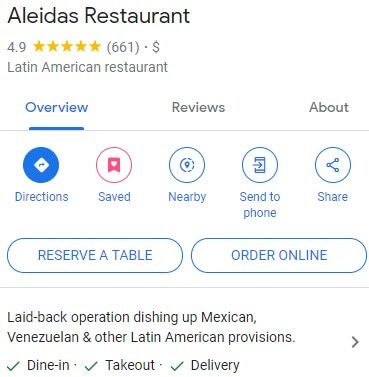
Link to GMB Profile - https://maps.app.goo.gl/y1S7cd9kirCYY8Js5
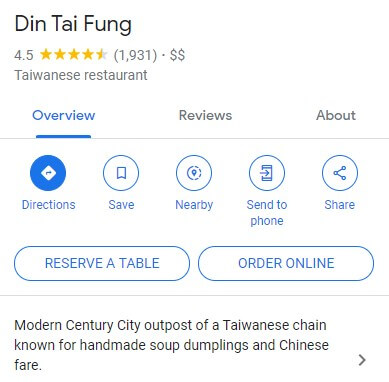
Link to GMB Profile - https://maps.app.goo.gl/cYYf14aeP3uAmkNB8
Conclusion and Future Trends
Summarizing Key Takeaways
In conclusion, Google My Business is an essential tool for local businesses looking to enhance their online presence and engage more effectively with their customers. By maintaining an optimized, active, and accurate GMB listing, businesses can significantly improve their visibility and appeal in local search results.
Predictions for Local Business Marketing
The future of local business marketing is likely to see even greater integration of online platforms like GMB with emerging technologies. Staying up-to-date with these trends and adapting to new features as they emerge will be key to maintaining a competitive edge.
Back to Blog Index